들어가며
이직한 뒤 맡게 된 프로젝트는 한동안 여러 사람의 손을 거치며 운영되어 온 레거시 프로젝트였습니다. 회사 차원에서도 프로젝트를 일회성으로 유지하는 수준이 아니라, 앞으로 지속적으로 운영해 나가기로 한 상태였습니다.
가장 먼저 고민한 것은 새로운 기능을 추가하는 일보다, 지금의 상태로 안정적으로 운영 가능한 기반이 갖춰져 있는가 하는 점이었습니다.
지속적인 운영과 유지보수를 위해서는 환경 분리, 코드 스타일 통일 등등 선행 작업이 필요했고, 이번 글에서는 그 과정에서 진행한 작업들을 정리해보려 합니다.
1. 환경 분리
기존 환경-백엔드 의존성-기능 영역 관계도는 대략 다음과 같았습니다.
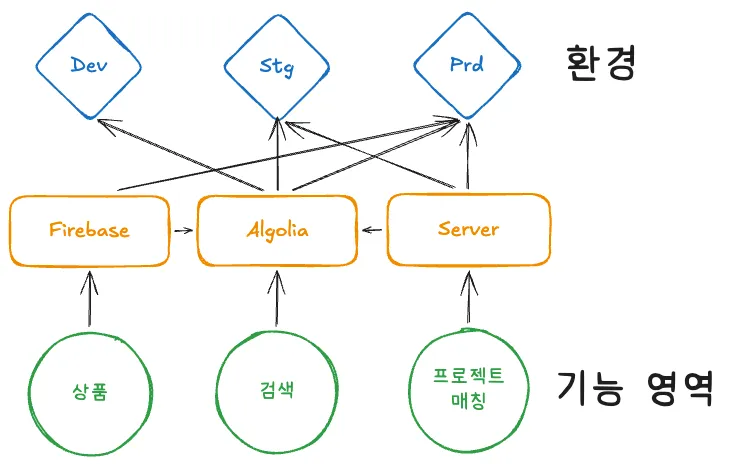
각 기능이 Firebase, Server를 혼합해 의존하고, 의존 관계가 dev·stg·prd 환경과 교차되면서 구조가 복잡해졌습니다. 그리고 검색엔진으로 사용하는 Algolia는 Firebase, Server 둘다에 의존하고 있습니다.
이 방식의 가장 큰 문제는 변경 영향 범위를 예측하기 어렵다는 점입니다.
하나의 기능을 수정해도 어떤 의존 대상을 통해 어느 환경까지 영향을 주는지 한눈에 파악하기 어렵고, 운영 환경에만 연결된 설정이나 데이터가 섞여 있으면 테스트와 검증도 제한됩니다.
1.1 Firebase 환경 분리
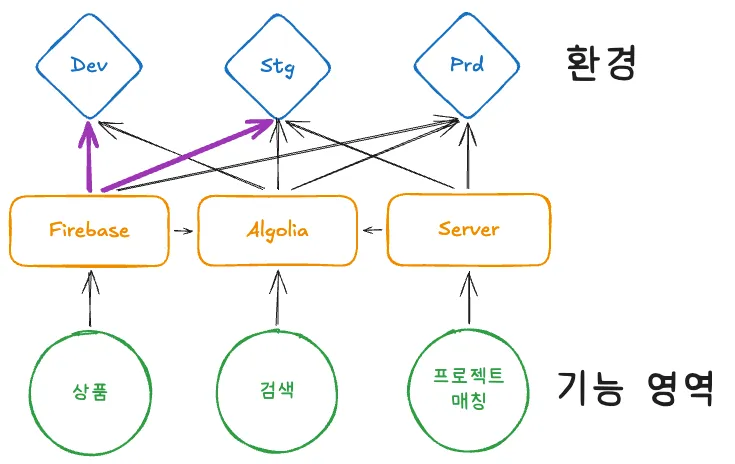
환경 분리 작업에서는 Firebase가 연결되는 환경부터 먼저 분리했습니다.
dev·stg·prd 기준으로 Firebase 환경을 선제적으로 나눠두면, 이후 기능을 Server로 이전하는 과정도 각 환경에서 독립적으로 검증할 수 있어 전체 작업의 안정성을 높일 수 있습니다.
즉, Firebase 환경 분리는 단순한 설정 분리가 아니라, 이후 의존성을 Server 중심으로 전환하기 위한 안전한 검증 기반을 마련하는 선행 작업이었습니다.
1.2 Server 통일
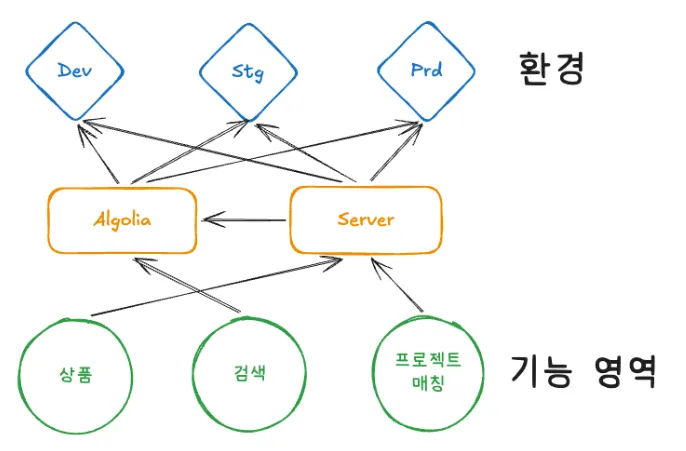
이후 백엔드 의존성을 Firebase에서 자체 Server로 통일하는 작업을 진행했습니다. 백엔드 개발자 또한 데이터 흐름과 책임 경계가 분산된 구조적 한계를 인지하고 있었기 때문에, 프론트와 백엔드가 함께 방향을 맞춰 기능 단위로 마이그레이션 범위를 나누고 순차적으로 이전을 진행했습니다.
그 결과 기능별 처리 경로가 서버 중심으로 정리되었고, 백엔드는 로직과 데이터 관리를 더 일관되게 가져갈 수 있게 되었으며 프론트엔드도 연동 방식이 단순해져 개발과 유지보수의 복잡도를 줄일 수 있었습니다.
2. 코드 스타일, 작성 규칙 통일
이 작업을 진행한 가장 큰 배경은, 프로젝트 안에 통일된 코드 작성 규칙이 없었다는 점입니다. 실제로는 프로젝트 차원의 일관된 기준보다 각 개발자의 IDE 설정이나 개인 습관에 따라 포맷과 스타일이 다르게 적용되고 있었고, 그 결과 같은 역할의 코드도 파일마다 표현 방식이 조금씩 달라지는 상태였습니다.
2.1 Prettier
코드 포맷은 보편적으로 쓰이는 Prettier를 사용해 정리했습니다.
들여쓰기, 줄바꿈 등 뿐만 아니라 @trivago/prettier-plugin-sort-imports를 사용하여 import 순서도 정렬했습니다.
@trivago/prettier-plugin-sort-imports 적용 예시
Input
import React, { FC, useEffect, useRef, ChangeEvent, KeyboardEvent } from 'react';
import { logger } from '@core/logger';
import { reduce, debounce } from 'lodash-es';
import { Message } from '../Message';
import { createServer } from '@server/node';
import { Alert } from '@ui/Alert';
import { repeat, filter, add } from '../utils';
import { initializeApp } from '@core/app';
import { Popup } from '@ui/Popup';
import { createConnection } from '@server/database';
Output
import { debounce, reduce } from 'lodash-es';
import React, { ChangeEvent, FC, KeyboardEvent, useEffect, useRef } from 'react';

import { createConnection } from '@server/database';
import { createServer } from '@server/node';

import { initializeApp } from '@core/app';
import { logger } from '@core/logger';

import { Alert } from '@ui/Alert';
import { Popup } from '@ui/Popup';

import { Message } from '../Message';
import { add, filter, repeat } from '../utils';
.prettierrc
{
  "semi": true, // 문장 끝 세미콜론 추가
  "singleQuote": false, // 쌍따옴표 사용
  "tabWidth": 2, // 들여쓰기 2칸
  "trailingComma": "all", // 후행 쉼표 항상 추가
  "printWidth": 80, // 한 줄 최대 80자
  "arrowParens": "always", // 화살표 함수 매개변수 괄호 항상 표기
  "endOfLine": "lf", // 줄바꿈 문자 LF로 통일 (OS 간 차이 방지)
  "bracketSpacing": true, // 객체 리터럴 중괄호 내 공백 추가

  // import 정렬 플러그인
  "plugins": ["@trivago/prettier-plugin-sort-imports", "prettier-plugin-tailwindcss"],

  // import 정렬 그룹 및 순서 정의
  "importOrder": [
    "^react$",
    "^next",
    "<THIRD_PARTY_MODULES>",
    "^@components/(.*)$",
    "^@apis/(.*)$",
    "^@config/(.*)$",
    "^@hooks/(.*)$",
    "^@store(.*)$",
    "^@constants/(.*)$",
    "^@utils/(.*)$",
    "^@assets/(.*)$",
    "^@styles/(.*)$",
    "^[./]",
    "^.+\\.(css|scss)$",
  ],
  "importOrderSeparation": true, // 그룹 사이 빈 줄 삽입
  "importOrderSortSpecifiers": true, // 같은 import 내 식별자 알파벳 정렬
}
(*글을 작성하는 시점에 찾아보니 prettier-plugin-packagejson, prettier-plugin-sort-json 플러그인으로 package.json, json 파일 또한 포맷을 적용해도 좋을 것 같습니다.)
2.1.1 .vscode/settings.json
.prettierrc 파일은 포맷 규칙을 정의하지만, 이것만으로는 모든 개발자의 vscode에서 동일하게 적용되지 않습니다. 저장 시 자동 포맷이 되지 않거나, 기본 포매터 설정이 다르면 규칙이 있어도 실제로는 적용되지 않는 상황이 발생합니다.
이를 해결하기 위해 .vscode/settings.json을 프로젝트에 커밋하여, 저장소를 클론하는 것만으로 동일한 vscode 환경이 구성되도록 했습니다.
.vscode/settings.json
{
  // 저장 시 Prettier가 자동으로 포맷을 적용합니다.
  "editor.formatOnSave": true,
  "editor.defaultFormatter": "esbenp.prettier-vscode",

  // 저장 시 ESLint 자동 수정도 함께 실행됩니다.
  "editor.codeActionsOnSave": {
    "source.fixAll.eslint": "explicit",
  },

  // 불필요한 공백과 파일 끝 줄바꿈을 일관되게 처리합니다.
  "files.trimTrailingWhitespace": true,
  "files.insertFinalNewline": true,
  "editor.tabSize": 2,

  // 프로젝트에 설치된 TypeScript 버전을 사용하도록 설정하여,
  // 편집기 내장 버전과의 차이로 발생하는 타입 불일치를 방지합니다.
  "typescript.tsdk": "node_modules/typescript/lib",
  "typescript.enablePromptUseWorkspaceTsdk": true,
}
(*확장 프로그램 설치까지 유도하도록 .vscode/extensions.json까지 설정해도 좋을 것 같습니다.)
2.2 ESLint
ESLint를 도입할 때 초기에는 심각도를 "warn"으로 설정해, 팀의 개발 흐름을 끊지 않으면서 규칙을 정착시키도록 했습니다.
error로 시작하면 빌드가 깨지고, 팀원 전원의 작업이 동시에 막힐 수 있습니다.warn으로 시작하면 CI의next lint는 통과시키면서도, 에디터의 노란 경고로 개선 포인트를 즉시 인지할 수 있습니다.- 경고가 충분히 줄어든 시점에
warn -> error로 단계적으로 격상하면, 품질과 생산성을 함께 가져갈 수 있습니다.
.eslintrc.json
{
  "root": true,
  "extends": ["next", "next/core-web-vitals", "prettier"],
  "rules": {
    "unused-imports/no-unused-imports": "warn",
    "react/display-name": "off",
    "react-hooks/exhaustive-deps": "warn",
    "@next/next/no-sync-scripts": "off",
    "no-console": "warn",
    "prefer-const": "warn",
    "no-var": "warn",
    "prefer-arrow-callback": "warn",
    "no-param-reassign": ["warn", { "props": false }],
    "object-shorthand": "warn",
    "prefer-template": "warn",
    "no-duplicate-imports": "warn",
    "react/jsx-no-target-blank": "warn",
    "react/self-closing-comp": "warn",
    "consistent-return": "warn",
    "no-fallthrough": "warn",
    "eqeqeq": ["warn", "smart"],
    "no-restricted-imports": [
      "warn",
      {
        "paths": [
          {
            "name": "antd",
            "message": "antd 대신 팀 내 컴포넌트를 사용하세요."
          },
          {
            "name": "@ant-design/icons",
            "message": "@ant-design/icons 대신 팀 내 아이콘 컴포넌트를 사용하세요."
          }
        ]
      }
    ]
  },
  "plugins": ["unused-imports"]
}
그리고 no-restricted-imports 규칙을 추가해, antd와 @ant-design/icons 신규 유입을 경고로 제한했습니다. 이를 통해 레거시 의존성에서 팀 표준 컴포넌트 체계로 점진적으로 이동시켰습니다.
실제 diff를 집계해보니, 포맷/룰 정비 작업이 코드베이스에 얼마나 큰 영향을 주는지 명확하게 확인할 수 있었습니다.
| 단계 | 변경 파일 수 | 변경량 |
|---|---|---|
| Prettier 일괄 적용 | 332개 파일 | +3,939 / -3,108 줄 |
| ESLint 룰 적용 | 82개 파일 | +315 / -315 줄 |
3. 미사용 코드, 파일, 주석, 패키지 정리
기능 변경과 구조 개편이 반복되며 더 이상 사용되지 않는 코드, 파일, 주석, 패키지가 쉽게 누적됩니다. 이러한 요소들은 실제 동작과 무관하더라도 코드 탐색 범위를 넓히고, 현재 기준과 과거 흔적을 구분하기 어렵게 만들어 협업과 유지보수 비용을 높입니다.
따라서 미사용 자산 정리는 프로젝트에 실제로 필요한 요소만 남겨 구조를 명확하게 하고, 이후 작업의 복잡도를 낮추기 위한 선행 작업이었습니다.
더 이상 접근이 불가하거나 지원하지 않는 페이지, 유저 흐름 상 도달하지 않는 페이지 10여 개가 있었고 이 외에도 수많은 미사용 코드가 존재했습니다.
3.1 Knip
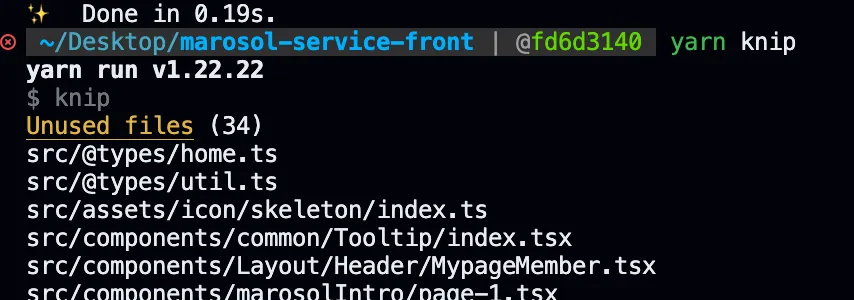
Knip은 JavaScript·TypeScript 프로젝트에서 사용되지 않는 항목을 점검하고 정리할 수 있도록 도와주는 도구입니다.
프로젝트 안에서 더 이상 참조되지 않는 파일, 타입, 의존성, export 등을 찾아내어, 불필요하게 남아 있는 코드를 정리하고 코드베이스를 더 가볍고 명확하게 유지하는 데 도움이 됩니다.
(*아래와 같이 정적 분석을 통해 프로젝트 내 미사용 파일을 빠르게 식별할 수 있습니다.)
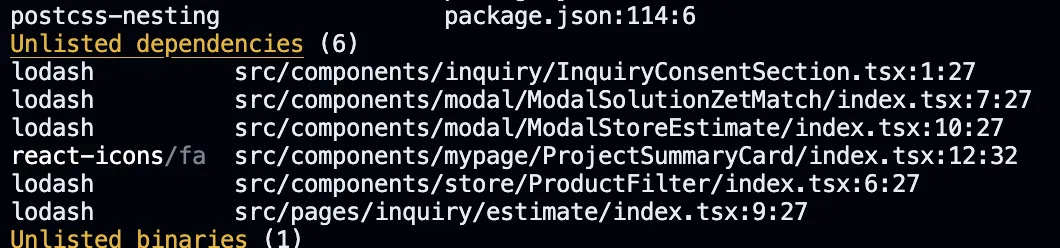
Knip을 도입한 목적은 미사용 코드와 패키지를 정리하는 것이었지만, 유령 의존성(package.json에 명시되어 있지 않지만 접근 가능한 의존성)을 탐지해줘 설치하는 작업도 함께 진행했습니다.
knip.json
{
  "$schema": "https://unpkg.com/knip@5/schema.json",

  // 분석의 시작점이 되는 진입 파일 (페이지, 설정, 스크립트 등)
  "entry": ["src/pages/**/*.{js,jsx,ts,tsx}", "next-sitemap.config.js", "scripts/**/*.{js,ts}"],

  // 미사용 여부를 검사할 전체 프로젝트 파일 범위
  "project": ["src/**/*.{js,jsx,ts,tsx}", "scripts/**/*.{js,ts}", ".storybook/**/*.{js,ts}"],

  // 코드에서 직접 import하지 않지만 필요한 패키지 (플러그인 등)
  "ignoreDependencies": ["eslint-plugin-prettier", "eslint-plugin-storybook"]
}
작업 적용 결과
| 항목 | 수치 |
|---|---|
| 제거된 dependencies | 9개 |
| 제거된 devDependencies | 9개 |
| 변경 파일 수 | 277개 |
| 삭제 라인 | −15,952 |
3.2 주석 제거
기존에 주석 또한 프로젝트 코드에 많이 남아있었기 때문에 jscodeshift 기반 스크립트로 일괄 정리했습니다. 라이선스, ESLint/TypeScript 지시자 등 보존이 필요한 주석은 패턴 매칭으로 제외했습니다.
package.json에 스크립트를 등록해 yarn strip-comments 한 줄로 실행할 수 있도록 했습니다.
"strip-comments": "jscodeshift -t scripts/codemods/remove-comments.transform.js src --extensions=js,jsx,ts,tsx --parser=tsx --ignore-pattern=**/*.d.ts"-t: 적용할 변환 스크립트 경로--extensions: 대상 확장자--parser=tsx: JSX/TSX 문법을 포함한 파서 사용--ignore-pattern=**/*.d.ts: 타입 선언 파일은 제외
remove-comments.jscodeshift.js
const PRESERVE_PATTERNS = [
  /@license/i,
  /^\s*!/,
  /eslint-(disable|enable|env|global)/i,
  /@ts-(ignore|expect-error|nocheck|check)/i,
  /@prettier-ignore/i,
  /webpackChunkName\s*:/,
  /^\s*global\s+/i,
];

const COMMENT_KEYS = ['comments', 'leadingComments', 'trailingComments', 'innerComments'];

function shouldPreserveComment(comment) {
  if (!comment || typeof comment.value !== 'string') {
    return false;
  }

  return PRESERVE_PATTERNS.some((pattern) => pattern.test(comment.value));
}

function filterCommentFields(node) {
  let changed = false;

  COMMENT_KEYS.forEach((key) => {
    const value = node[key];

    if (!Array.isArray(value) || value.length === 0) {
      return;
    }

    const nextValue = value.filter(shouldPreserveComment);

    if (nextValue.length !== value.length) {
      changed = true;
    }

    if (nextValue.length === 0) {
      delete node[key];
      return;
    }

    node[key] = nextValue;
  });

  return changed;
}

function walk(value) {
  let changed = false;

  if (Array.isArray(value)) {
    value.forEach((entry) => {
      if (walk(entry)) {
        changed = true;
      }
    });

    return changed;
  }

  if (!value || typeof value !== 'object') {
    return false;
  }

  if (typeof value.type === 'string') {
    if (filterCommentFields(value)) {
      changed = true;
    }
  }

  Object.keys(value).forEach((key) => {
    if (key === 'loc' || key === 'start' || key === 'end') {
      return;
    }

    if (walk(value[key])) {
      changed = true;
    }
  });

  return changed;
}

module.exports = function transform(fileInfo, api) {
  const j = api.jscodeshift;
  const root = j(fileInfo.source);
  const ast = root.get().value;

  const changed = walk(ast);

  if (!changed) {
    return null;
  }

  return root.toSource({
    quote: 'double',
    trailingComma: true,
    reuseWhitespace: true,
  });
};
4. Dependabot
Dependabot은 GitHub에서 제공하는 의존성 자동 업데이트 도구로, 새 버전이 발견되면 PR을 자동으로 생성해줍니다. .github/dependabot.yml 업데이트 주기, 범위, 그룹화 등을 선언적으로 설정할 수 있습니다.
설정 시 고려한 점은 다음과 같습니다.
- 직접 의존성만 관리:
allow: [dependency-type: "direct"]로 제한하여 하위 의존성 PR 노이즈를 방지 - 역할별 그룹화: Next.js, React, TypeScript 등 관련 패키지를 묶어 하나의 PR로 함께 업데이트
- patch 자동 병합: patch 업데이트는 GitHub Actions 워크플로를 통해 자동 병합되도록 구성
dependabot.yml
version: 2

updates:
  # Root (/) - Next.js 앱
  - package-ecosystem: "npm"
    directory: "/"
    schedule:
      interval: "weekly"
      day: "wednesday"
      time: "07:00"
      timezone: "Asia/Seoul"

    open-pull-requests-limit: 10
    rebase-strategy: "auto"

    # 직접 의존성만 관리하여 하위 의존성 PR 노이즈 방지
    allow:
      - dependency-type: "direct"

    labels:
      - "dependencies"

    commit-message:
      prefix: "chore"
      include: "scope"

    # 역할별 그룹화로 관련 패키지를 하나의 PR로 묶음
    groups:
      next-ecosystem:
        patterns:
          - "next"
          - "eslint-config-next"
          - "@next/*"
          - "next-*"
        update-types: ["patch"]

      react-ecosystem:
        patterns:
          - "react"
          - "react-dom"
          - "@types/react*"
          - "react-*"
        update-types: ["patch"]

      typescript-ecosystem:
        patterns:
          - "typescript"
          - "@types/*"
          - "ts-*"
          - "tslib"
        update-types: ["patch"]

      lint-format:
        patterns:
          - "eslint"
          - "eslint-*"
          - "@eslint/*"
          - "@typescript-eslint/*"
          - "prettier"
          - "stylelint"
          - "stylelint-*"
        update-types: ["patch"]

      style-build-tooling:
        patterns:
          - "tailwind*"
          - "postcss*"
          - "autoprefixer"
        update-types: ["patch"]

      test-tools:
        patterns:
          - "jest*"
          - "@jest/*"
          - "vitest*"
          - "@vitest/*"
          - "playwright"
          - "cypress"
          - "@testing-library/*"
          - "msw"
        update-types: ["patch"]

      # 리스크가 높은 패키지는 별도 그룹으로 분리
      observability:
        patterns:
          - "@sentry/*"
          - "sentry-*"
        update-types: ["patch"]

      firebase:
        patterns:
          - "firebase"
          - "@firebase/*"
        update-types: ["patch"]

      analytics-tooling:
        patterns:
          - "mixpanel-browser"
          - "smartlook-client"
          - "@vercel/analytics"
        update-types: ["patch"]

      runtime-deps:
        dependency-type: "production"
        update-types: ["patch"]

      dev-deps:
        dependency-type: "development"
        update-types: ["patch"]

  # GitHub Actions도 함께 관리
  - package-ecosystem: "github-actions"
    directory: "/"
    schedule:
      interval: "weekly"
      day: "monday"
      time: "10:30"
      timezone: "Asia/Seoul"
    open-pull-requests-limit: 5

    allow:
      - dependency-type: "direct"

    labels:
      - "dependencies"
      - "ci"

    commit-message:
      prefix: "chore"
      include: "scope"

    groups:
      github-actions:
        patterns:
          - "*"
        update-types: ["patch"]
dependabot-auto-merge.yml
# Dependabot이 생성한 PR에 대해 patch 업데이트를 자동 병합하는 워크플로
name: Dependabot direct merge

# PR이 열리거나 업데이트될 때 실행
on:
  pull_request:
    types: [opened, synchronize, reopened]

# PR 병합과 승인에 필요한 권한
permissions:
  contents: write
  pull-requests: write

jobs:
  dependabot:
    runs-on: ubuntu-latest
    # Dependabot이 생성한 PR인 경우에만 실행
    if: github.event.pull_request.user.login == 'dependabot[bot]'
    steps:
      # PR의 업데이트 유형(major/minor/patch)을 가져옴
      - name: Fetch Dependabot metadata
        id: metadata
        uses: dependabot/fetch-metadata@d7267f607e9d3fb96fc2fbe83e0af444713e90b7
        with:
          github-token: ${{ secrets.GITHUB_TOKEN }}

      # patch 업데이트일 때만 자동 병합 활성화 (major/minor는 수동 리뷰)
      - name: Enable auto-merge for patch updates
        if: steps.metadata.outputs.update-type == 'version-update:semver-patch'
        run: gh pr merge --auto --merge "$PR_URL"
        env:
          PR_URL: ${{ github.event.pull_request.html_url }}
          GH_TOKEN: ${{ secrets.GITHUB_TOKEN }}
정리하며
~